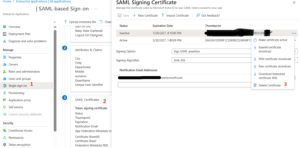
SAML certificates are an important part of Single Sign-On (SSO) in a Security Assertion Markup Language (SAML) environment. SAML certificates are used to establish trust between the identity provider (IdP) and the service provider (SP) in a SAML-based SSO scenario. When setting up an enterprise application in Entra, a default SAML certificate is generated. At least one active certificate is necessary to authenticate single sign-on. Continue reading
Remove certificate from a Single Sign-On Enterprise Application
How to disable MFA for all users except the admins in the M365
For a number of reasons, I am often asked how to disable MFA for all users except the administrator in M365 , for example for: educational institutions like schools, etc…
If you don’t want to do it, you can still limit access to specific IPs or networks. This can be done under the ‘Network’ settings by selecting ‘Any network’ or specifying particular locations. However, I’ll explain this topic in more detail in another post.
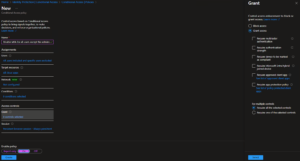
To disable multi-factor authentication (MFA) for all users except the administrator in a Microsoft 365 environment using Conditional Access, the following steps are required:

How to Turn Your Hobby into a Career as an IT Professional
It’s never too late to turn your passion into a career, as many companies do not place much emphasis on a diploma or degree in IT but are looking for experienced and enthusiastic colleagues. The transition from hobbyist to IT expert is not only possible but also incredibly rewarding. Here are some steps you can take on your journey to transform your passion into a career. Continue reading

Can I set up recurring access reviews for different Azure AD roles
Here is how you can set up recurring access reviews for different Azure AD roles using.

Azure AD Privileged Identity Management (PIM):
- Create an Access Review:
In the Microsoft Entra admin center, go to Identity governance > Privileged Identity Management.
Select Azure AD roles under “Manage”.
Continue reading
Posted in Entra ID (Azure)
Leave a comment
How does DMARC improve email authentication compared to using SPF and DKIM alone
DMARC improves email authentication by building upon SPF and DKIM in a few key ways:
- Alignment check: DMARC requires the domain in the “From:” header of the email to align with either the domain specified by SPF or DKIM. This prevents attackers from using your domain name in the “From:” field while using a different domain that passes SPF/DKIM. Continue reading
Posted in Generally
Leave a comment
How do I limit the duration of privileged role assignments in Entra ID
Limiting the Duration of Privileged Role Assignments in Entra ID
Entra ID (formerly Azure Active Directory) provides the ability to limit the duration of privileged role assignments, which can help enhance the security of your organization’s identity management. Here’s how you can do it:
Step 1: Understand Privileged Role Assignments
Privileged role assignments in Entra ID grant users elevated permissions, such as the ability to manage other users, access sensitive data, or perform critical administrative tasks. Limiting the duration of these assignments can help reduce the risk of unauthorized access and ensure that users only have the necessary permissions for the required time. Continue reading
Posted in Generally
Leave a comment
How to create custom roles with specific permissions in Azure AD
Creating Custom Roles with Specific Permissions in Azure AD
Creating custom roles with specific permissions in Azure Active Directory (Azure AD) can be a useful way to grant users the exact level of access they need, without giving them unnecessary privileges. Here’s a step-by-step guide on how to do it:
Step 1: Understand Azure AD Roles and Permissions
Azure AD has a set of built-in roles, such as Global Administrator, User Administrator, and Security Administrator. These roles have predefined permissions that you can assign to users. However, if the built-in roles don’t meet your specific needs, you can create custom roles. Continue reading
Posted in Entra ID (Azure)
Leave a comment
What are the key benefits of using DKIM, DMARC, and SPF together
Using DKIM, DMARC, and SPF together provides several key benefits for email security:
- Prevents email spoofing: SPF checks the IP address of the sending mail server against a list of authorized IP addresses to verify the sender’s identity and prevent spoofing. DKIM adds a digital signature to the email headers that can be verified by the recipient’s mail server. Continue reading
Posted in Generally
Leave a comment
How do DKIM, DMARC, and SPF work together to secure email
DKIM, DMARC, and SPF work together to provide a comprehensive email authentication and security framework:
- Sender Policy Framework (SPF):
-
- SPF is an email authentication protocol that allows the owner of a domain to specify which mail servers are authorized to send email on behalf of that domain.
- SPF checks the IP address of the sending mail server against a list of authorized IP addresses published in the domain’s DNS records.
- SPF helps prevent email spoofing by verifying the sender’s identity.
-
Posted in Generally
Leave a comment
How can I automate the revocation of privileged roles in Azure AD
Here are the key steps to automate the revocation of privileged roles in Azure AD:
- Use Azure AD Privileged Identity Management (PIM): PIM provides the ability to create access reviews for Azure AD roles. This allows you to regularly review privileged access and automatically revoke unnecessary permissions.
Continue reading
Posted in Entra ID (Azure)
Leave a comment